
Par for the course (at least for consumers) with network-attached storage, or NAS, is a sense of trepidation. This usually revolves around the complexity of it all. That’s meant for offices, isn’t it? Taiwanese tech giant Synology has effectively turned that conventional wisdom on its head with a consumer-focused NAS product that simplifies two things—local storage that’s easy to set up and use, and access from anywhere. That is the thing about consumer-focused, uncomplicated network storage products—there simply aren’t many choices. The BeeStation collates local files, photos on your phone, manages cloud storage, and external drives into a comprehensive and intuitive symmetry.
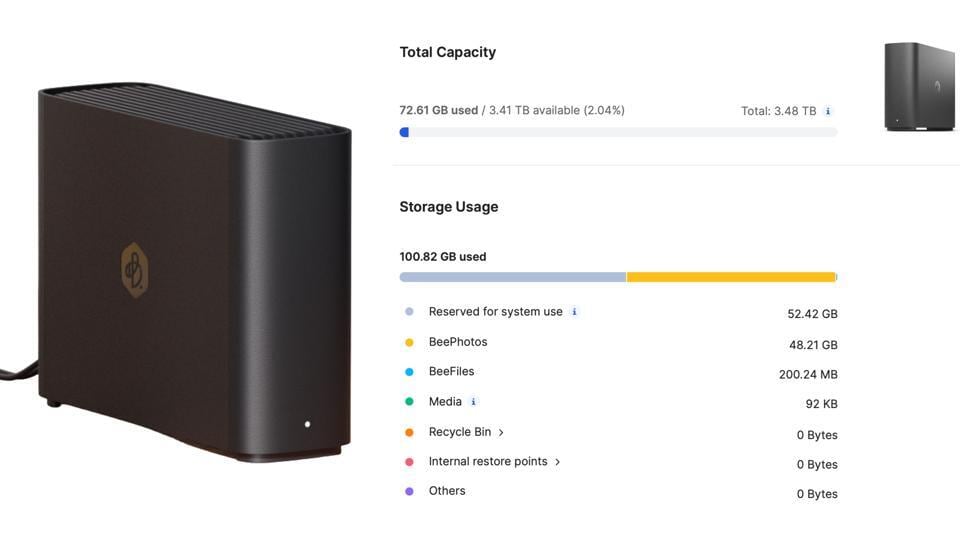
At the foundation of this experience, the BeeStation (the BST150-4T model, to be specific) provides 4TB of storage out of the box in its present generation, unlike many NAS devices that don’t include the drives. But one thing is not in their control: the supply chain and storage pricing, which of course reflects in the price tag. You’ll be able to buy a Synology BeeStation in India for around ₹50,000 for this storage spec and network capabilities. This has a 3.5-inch hard drive, and if it’s placed somewhere in very close proximity as data is being synced, a familiar clicking sound of a hard drive spinning is faintly audible.
I’ll give you a cost comparison with the Google AI Pro plan, which gets you 5TB of cloud storage in addition to access to certain Gemini AI models. Purely on the storage aspect, as a data backup and archiving lake, this plan is priced at ₹1,950 per month which works out to ₹23,400 per year. It is a similar story for the Box Business Plus plan, priced at ₹1,980 per month for unlimited cloud storage but limited to 15GB file size per individual upload. In about a couple of years, the BeeStation will pay for itself, while keeping your data on-premise, and providing the convenience of local storage.
Further helping make a case for Synology are two very neat companion apps for your phone, called BeeFiles and BeePhotos, available on Android devices as well as the iPhone and iPad. As the names suggest, you’d be fairly clear about what each focuses on. This is in addition to the web interface, which is easy to navigate across web browsers.
The key is Synology using something called the BeeStation OS, instead of the DSM software their enterprise-focused NAS systems use. Setting up the Synology BeeStation takes minutes, or less if no firmware update is ready to be delivered. There is a unique QR code inside each BeeStation box that can be scanned using the phone’s camera (or there is a URL you can point the browser straight to), which guides you through the process of getting the BeeStation connected to your router, and online. This is powered by a Realtek processor with 1GB DDR4 memory.
All the connectivity and controls are at the rear of the fairly compact matte black enclosure. The rear features the power button, a USB-C 3.2 Gen 1 port, a USB-A 3.2 Gen 1 port, a 1GbE LAN port and a 36-watt power supply. An LED indicator at the front—solid white means normal operation, blinking white means booting up or shutting down, and a blinking orange LED means drive error whereas a breathing orange LED points to a firmware update in progress.
There are three core ways to make the most of the Synology BeeStation. Local storage including for photos on your phone, is attached to the network for easy access on your phone or desktop anywhere in the world. Secondly, use the two USB ports to bring any other external drives you may have, into this fold of easy access via the network. Third, back up files directly from cloud services including Google Drive, Dropbox and Microsoft OneDrive.
The BeeFiles app is quite simple to get the hang of, and it is incredibly convenient to have your local storage available on your phone as you travel or while you are at work, instead of the complexity of PC access. Secondly, this is a more reliable and reassuring option for those who prefer local storage over cloud services. I know I do. This isn’t the fastest storage that you’ll get your hands on, because it returns close to 100MB/second of data transfer speeds when writing a file to the BeeStation. If you have a large folder that needs to be moved, keep some time in hand, depending on the fragmentation within that folder.
The BeePhotos app could have done a bit better in terms of identifying how many photos need to be backed up, because in my experience of backing up more than 20,000 photos from my iPhone’s Photos app to the Synology BeeStation, it was a bit confusing in terms of how many items remain and how much estimated time would be taken for task completion. I noticed during this bulk backup that either the app resets midway or the NAS reinitializes the connection, which means the indexing to identify which photos and videos to back up begins again. That can be somewhat time consuming.
While an external drive can be plugged into the Synology BeeStation and network access is extended to that as a result, that cannot become the point of delivering any new files, documents or photos when you’re syncing data from your phone or PC or the cloud. You can move files from the BeeStation’s 4TB storage to that external drive though, but that cannot become the automated pool to receive new syncs.
By default, a key data protection option of Internal Restore Points is turned off. You should turn this on, because it creates periodical snapshots of the state of the Synology BeeStation at specific intervals of time—important if you wish to quickly restore some lost files that may have been accidentally modified, deleted, or if there was a drive malfunction at some point. You can set the backup option as well for everything that’s on the Synology BeeStation, on the Synology C2 storage, another NAS or an external drive.
The purpose of the Synology BeeStation is to create a personal network-attached storage without having to get into any complications of subscriptions or features behind a paywall. Synology has kept things very simple with the BeeStation, as a very intuitive and simple way to back up and access documents, files, photos and other work that you may have otherwise been using external drives or cloud storage subscriptions for. Ease of use over performance, is the simple formula that Synology has done well to work with.
There will of course be a question if 4TB is enough for users. For most, it should easily be. Unless you are backing up large swathes of 4K video files, 4TB has more than enough headroom for most households. Even collectively, since the BeeStation can be accessed by multiple users, who each get their own pool of remotely accessible local storage. Reassurance of having your files and photos saved locally, and not having to pay for fairly expensive cloud storage subscriptions, are two long-term advantages of an uncomplicated consumer NAS solution such as the Synology BeeStation. The time we live in, does add a premium to its price tag though.