
There is something quite marvellous about the Apple HomeView. It does many things. It signifies Apple is very serious about the smart home space. It is also a testament to how far along Siri AI has come, to be front and centre of your artificial intelligence (AI) usage at home or at work. It is versatile, good enough to find utility in a kitchen, a work desk, or on your bedside table. Last but not least, it is good and most certainly will get better as the ecosystem places its pieces of the jigsaw.
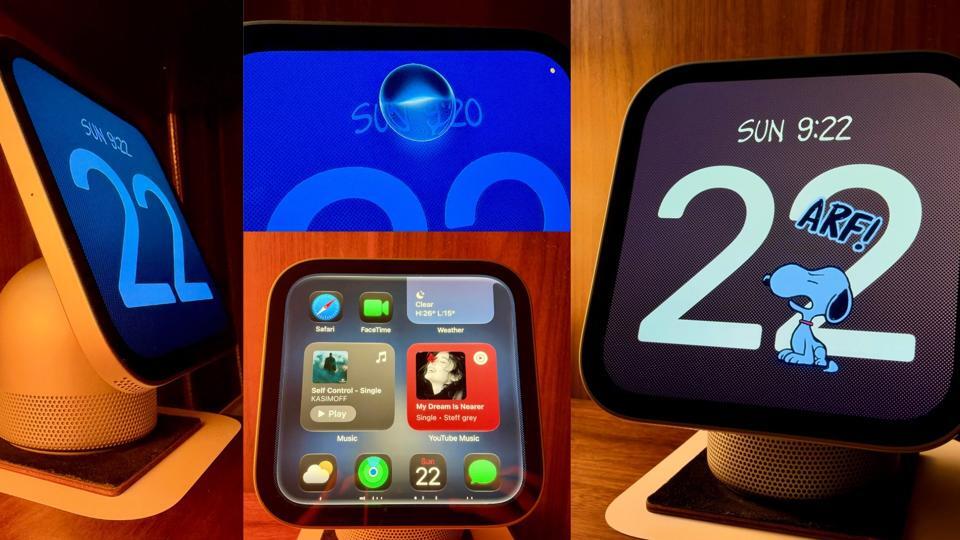
It will still divide opinion. Some at home will immediately love it. Others will say “I’ll just use my iPhone or iPad”. What Apple has done here is meld four critical elements, into what is a very likeable package (yes, I’m on that side of the fence). That in itself is crucial for Apple’s smart home efforts. They have taken a smart speaker (already have the HomePod and HomePod mini knowledge), stretched the aspect ratio of an Apple Watch into a 7-inch canvas, underlined the HomeView software with an A18 chip also seen in the iPhone 16 series, and bolted on the completely redone and very capable Siri AI.
Three things now need to happen. The Apple HomeView has incredibly powerful hardware, Apple simply must make more use of this on the software (and the reliability of privacy safeguards) side of things. Secondly, the ecosystem play has to come together sooner—teenagers won’t find it cool enough until Netflix is on it. And third (this in a way links to point one), apps on the HomeView including the smart home setups, need to be more elaborate.
The thing is, as is the rule with tech these days, the HomeView will also cost a pretty penny—its ₹39,900 for the desktop version and the same price if you wish to have it wall-mounted goes up by about ₹6,900 more for the necessary Power Mount USB-C Wall Connector. The latter method should work great if smart home controls is a key use case—wall-mount this in the hallway or somewhere near the kitchen, and it can be your companion for discussing recipes too. It is this very price point that demands commitment.
This competes with the Amazon Echo Show 8, which now gets the Alexa+ subscription bundle in India and is priced at ₹24,999—but for someone very much into the Apple ecosystem with an iPhone or an iPad, the Echo doesn’t even come close in terms of context or utility. Except as a smart home hub, perhaps.
FaceTime calls, Apple Music, Siri AI drawing personal context from your data, handoff from an iPhone, iCloud, Photos, even Messages—an Apple HomeView syncs with your data, settings, and preferences much better than any Echo can perhaps manage. The HomeView also works for more than one user at home, as different profiles are contextualised to their data.
At this point, it must be noted that the HomeView doesn’t have a Siri app as it is on the iPhone, iPad or Mac, but it’s the foundation for the conversational assistant. Maybe there is a case for an app, in case a user wants to revisit a conversation from the Siri app, while cooking?
I wanted to touch upon the personal information displayed within apps on the Apple HomeView. Up to six family members can have their profiles within HomeView, and each gets their face and voice recognition as mandatory steps during the setup. Once that is done, HomeView uses Secure Exclaves and ambient sensing recognition using face or voice, or the context of proximity of your iPhone lets it know the user of that profile is around.
If the HomeView doesn’t recognise you, the data from your apps should not be visible to any other user. The HomeView does recognise a user instantly based on three conditions. First, HomeView recognises a user’s face. Secondly, the paired iPhone or iPad is present and connected to the same Wi-Fi network (but, the user could be in a different room?). And third, that paired device has been recently unlocked.
Apple’s intention is that if the HomeView doesn’t recognise you, you’ll either be asked to switch to your profile or see a ‘guest interface’ and not another user’s personal information. That, however, isn’t consistently how things worked in my tests.
At this point, I must note that the privacy safeguards for profile switching authentication aren’t always as robust as one would expect them to be. Quite often, it is all too easy to access personal content of other profiles without them being in the same room, by simply not switching out of them. In my tests, I stayed on the profile of another user and was able to see personal information (including messages) of that user without them being anywhere nearby. HomeView did not prompt me to switch to my profile, or lock the other profile’s content.
That needs to improve, because it happened more than once. At other times, face recognition popped up a prompt, asking me to switch to my profile. As it should. Incoming calls, at least in my tests, were handled more consistently. A call on my iPhone would also ring on the HomeView only when it recognised me in front of the screen.
Difficult to talk about a smart speaker without addressing the speaker itself. Apple knows sound, as we have experienced with the HomePod and the HomePod mini over the years. In terms of audio quality, the Apple HomeView sits somewhere between the larger HomePod and the HomePod mini—the vocals and soundstage are as impressive as the HomePod does for the most part, while lower frequencies are a notch lesser of course, but still more prominent than a HomePod mini.
The HomeView’s music delivery is relaxed, and it is exactly the sort of speaker you’d want as a companion near your work desk at home, or while cooking, for instance. This also fills up a bedroom easily. For now, both Apple Music and YouTube Music are working seamlessly on the HomeView. That in a way summarises the need for the app ecosystem to come together and deliver utility on the smart hub.
Quite a few apps from the phone do show up on the HomeView, but not all. Apple says there are two custom full-range drivers that sit beneath the cylindrical base with a dome to which the display is attached via an adjustable arm, as well as a custom down-firing woofer and dual force-cancelling passive radiators. The wall-mounted version of the HomeView loses the woofer and radiators, because it is designed to be flush with the wall.
At some point, Apple’s approach to customising the HomeView faces will have to become a bit more flexible. I’d quite like the option of placing more widgets on the ambient display itself, instead of having them largely reserved for the screen you get upon swiping up. That said, the Snoopy face is incredibly fun, particularly if you have a child at home.
Apple is late to the smart home hub party, but has most certainly arrived in style. It is versatile enough with how a user interfaces with it, powerful hardware underlines this experience, and it has all the tricks to control your smart home devices as you’d piece that puzzle together. Yet, there is the complication of the price, particularly in an era when consumer tech is becoming considerably more expensive.
Siri AI and personal context give Apple and the HomeView a distinct advantage for long-time users of the ecosystem across an iPhone, iPad or Mac. But being able to see each other’s texts will be a concern for some. There is already an option to disable Personal Content altogether, but Apple could make these controls more granular. I’d quite like the flexibility to have my entertainment and streaming subscriptions available on the HomeView, without necessarily allowing access to my messages on a shared household screen.
That can be improved, with future software updates, and will define it as a family hub with secure personal profiles. The fact that Siri AI on the HomeView is technically still in beta phase, indicates this is very much work in progress.