
Opening thoughts. The ₹3,99,900 Apple Studio Display XDR (which many think is just a very expensive display) has now received clearance from the US Food & Drug Administration for use in diagnostic radiology. This means Apple can now go ahead and release the Medical Imaging Calibrator for users, starting with the US market. At the time of the Studio Display XDR’s release last month, Apple had detailed the new DICOM medical-imaging presets and Medical Imaging Calibrator to enable use in diagnostic radiology, which would allow radiologists to view diagnostic images.
Very few displays have this level of application clearance. LG’s 32HL512D-B medical grade monitor has clearance for general diagnostics usage. Sony’s radiology monitor LMD-DM50 is also cleared for mammography usage. But consumer-first monitors with this level of accuracy? The Studio Display XDR has to be the first.
EDITOR’S CORNER | Airtel’s eSIM shenanigans
It turns out, Airtel has refined the process (if that’s really how you want to describe it) of switching physical SIMs to eSIMs, if you are switching from your current iPhone to a new iPhone.
I have my reservations about this being a refinement, because while simplicity and seamlessness is a good thing, integrating it within Apple’s setup/switching flow means it’ll startle unsuspecting users—and it has happened recently. While there are advantages of an eSIM, I believe the disadvantages far outweigh those.
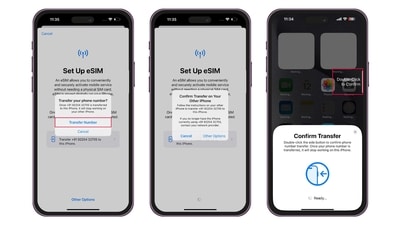
What’s basically happening is this: If you are setting up a new iPhone to switch from your current iPhone, and choose the “Transfer from Nearby iPhone” option, at some stage you’ll be prompted with messages similar to ‘set up mobile service’ or ‘switch mobile service to new iPhone’. It is easy to believe this is part of the data-switching process, but it isn’t, and can convert your physical SIM to an eSIM.
- I’ve found the key to this behaviour—if your physical SIM is still in the old iPhone you’re switching from, this unintended SIM switch happens. You must place the physical SIM in the new iPhone before powering it on for setup, to avoid this somewhat surreptitious setup eccentricity.
Still, this should not happen without explicit and clearer instructions that a SIM is being replaced by an eSIM. What does “transfer a phone number” tell us? Absolutely nothing. Looking at you, Airtel and Apple; someone needs to fix this.
There are advantages of an eSIM, one of those being most smartphones now support multiple eSIMs which gives users some convenience about primary and secondary numbers, data usage and international roaming. But these, in my book, far outweigh the inconvenience of difficulties when switching or swapping phones (it may often need something called EDID—a 32-digit device specific code). And don’t even get me started on the fact that SMS services are limited for 24 hours post an eSIM transfer or swap. Absolutely not on a par with simply moving a physical SIM from one device to another.
TECH SPOTLIGHT | Oakter Mini UPS V3.0
There are two realities of living in India. First, 24X7 electricity is still a pipe dream that seems to drift farther away during the summers. Second, disconnection of the home broadband in case of power cuts is inconvenient. Till now, the best option for you would’ve been to buy a typical 600va UPS and connect the modem/router to that. The other alternative was buying one of those “router UPS” devices with built-in batteries, but the methodology of installation was a bit more complicated than most folks would be able to navigate (matching the router connector pin type with the router’s port being one, voltage being another).
Oakter has changed that, with a rather convenient Mini UPS AirFiber V3.0 for routers, and I really like this approach.
This is basically a powerstrip-sized device, with a 12,000 mAh battery capacity (there are six cells rated at 2,000 mAh each) and a universal socket for typical Type D plugs and two-pin plugs. That should cover almost all routers, including those that are provided by Airtel and Jio for home broadband and 5G broadband.
The standard socket type also means you can use a three-way plug, if you’ve deployed a modem+router combination. This is a simple plug-and-play format, and it simply works. At this time, the price tag is ₹2,899 but you can expect some discounts or cashback offers on different e-commerce platforms at different points in time.
The polycarbonate body, with the enamel white finish, should sit easily on any table or console that you may be placing your router on. It has a single switch, or power on or off. And there’s a tiny light which shows the charging status (even if the Mini UPS V3.0 may be powered down). This connects to the wall socket via a three-pin plug, much like any higher capacity UPS. While I haven’t had this UPS long enough to judge how well the battery capacity and stamina reliability aspects hold up over a longer term, this has been able to handle my dual combination of the Airtel Xstream CPE (this is the modem) alongside the Ubiquiti Amplifi router whenever there is a power cut and before the backup power registers its presence.
This gap can be anywhere between 10 seconds to 30 seconds, but in my experience, Oakter has designed this well enough to hold up for as much as 30 minutes—that’s the maximum I’ve stretched this, and this observation should cover the dynamics of most use cases in homes.
For once, all the signs point to a typical router UPS lasting long and bucking the trend wherein these devices have a typical lifecycle of a few months before the battery starts to wear out noticeably. Oakter has done a good job with the V3.0 and this bodes well for simplification of installation design across the competition too.
SECOND THOUGHTS | Instagram’s new content safeguards
A few days ago, Meta Platforms Inc. detailed some updates for Instagram Teen Accounts, in terms of stronger safeguards defining age-appropriate content being visible on the feeds of teenage users. First, a content filter that Meta says is inspired from the 13+ movie ratings criteria and parent feedback by default. “This means that Instagram’s goal is for teens to see content on Instagram that’s similar to what they would see in an age-appropriate movie. Teens under 18 will be automatically placed into an updated 13+ setting, and they won’t be able to opt out without a parent’s permission,” the company says.
There are other changes too. Meta says teens will no longer be able to follow accounts that are noted to regularly share age-inappropriate content, or if their name or bio suggests the account is inappropriate for teens. The social media platform will also block a teen’s ability to see content results for a wider range of mature search terms, such as ‘alcohol’ or ‘gore’, and this is an extension from blocks in place for sensitive topics such as self-harm and eating disorders.
For parents who allow their children a place on Instagram from the teen years, this must come as some level of comfort—but, of course, Meta says no system is perfect and that parents must continue to give feedback.
Wired Wisdom peels away the glitz for a closer look at Technology & AI, with the hope to critically analyse how it impacts you, the human. Want this newsletter delivered to your inbox? Subscribe here.